This guide is for Users. See also the guides for Admins and for Sysadmins.
Concepts
There are two main types of entries in eLabFTW: Experiments and Resources.
Experiments are records of scientific investigations. Resources are things that exist in the lab, such as Plasmids, Chemicals or Equipment.
While similar, they differ in the following ways:
- Resources can be booked using the Scheduler
- Resources can be re-ordered through the procurement system
Both Resources and Experiments can have Templates, Tags and links, along with a Category and a Status. Many of the options for creating and editing Experiment entries are the same as those for Resource entries.
Scope
An important aspect of the software, is that entries can be shared between users, user groups and teams. If many entries are visible to you, it might get overwhelming. You can select what is listed by using the Scope button or selecting the corresponding entry from the menu.
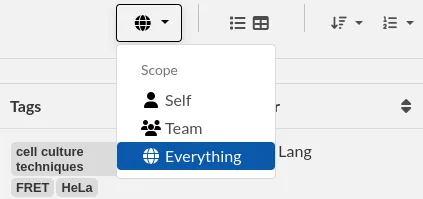
Set the scope to "Self" to display only Experiments that you created. Note that the Resources or Templates pages also allow you to filter entries using the scope button, and your selection is remembered.
To see entries from another team, make sure to set the Scope to Everything.