FAIR aspects
FAIR stands for Findable, Accessible, Interoperable and Reusable. This term applies to research data and an ELN such as eLabFTW can help you make your research data more FAIR.
Persistent identifiers in eLabFTW
elabid
This is an immutable identifier generated for each Experiment or Resource and looks like this:
20260612-8d5f3a5b81a395c113f954d33d5a7d4da30a7bc9
It starts with the creation date followed by a random string of characters.
ORCID
ORCID (website) are identifiers for researchers. It is possible to set your ORCID from your profile:
- Go on Settings page
- Go on Account tab
- Set your ORCID
Automatic ORCID assignation
Since version 5.6 it is possible to define an attribute at the IdP level so ORCID can be populated from SAML response. For example, set eduPersonOrcid or 1.3.6.1.4.1.5923.1.1.1.16 in IdP attributes, so user accounts will get assigned an ORCID directly upon login if it is sent by the IdP.
ROR
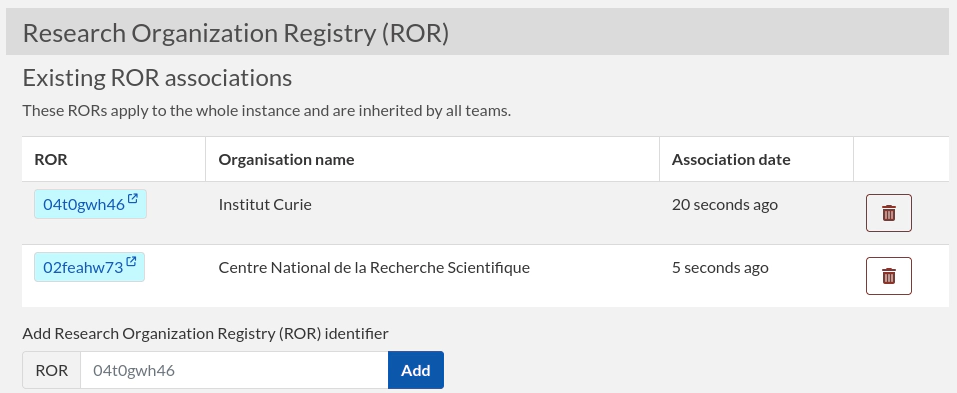
ROR (website) are identifiers for organizations. It is possible to define ROR associations at three different levels:
- Instance level
- Team level
- User level
As a Sysadmin, you can add ROR from the Sysconfig page. These will then apply to everyone on the instance.
As a team Admin, you can add ROR from the Admin panel. These will then apply to everyone in your team.
As a User, you can add ROR from your Profile page.
ROR are exported in .eln exports, and also visible in PDF exports.
ELN
The .eln file format, based on RO-Crate allows you to export and import data to and from your eLabFTW instance. See Import/Export page.