Coordinator guide
What is an Instance Coordinator
An instance coordinator helps manage the users in an instance. For example, they may add and remove users from different teams, and help to implement exit strategies for users and data. More information about the utility of this role and helpful strategies will be added soon!
Training sessions
As an instance coordinator, it is a good idea to organize training sessions for users. You can either opt for Deltablot's training session or make one yourself. It can also just be a discussion with users about their use of the software and the difficulties they might have with it and how to address them.
Internal exchange
In order to help users, we recommend making available a place for everyone to exchange on eLabFTW. It could be a Slack/Teams/Mattermost channel, or a forum or anything else that is easy to access for everyone involved. They can use this place to ask questions directly to the coordinator.
Different strategies for managing users in teams
When a user leaves a team
In eLabFTW, there are currently several options for handling the data of users who are about to leave a team. Here are a few exit strategies to consider:
A. The User is completely gone
If someone stopped working in the lab and will likely not come back, archiving them is the best option. It prevents them from using their account while still allowing other team members to see their past work.
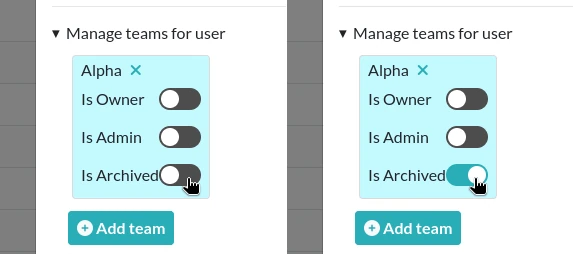
From the Admin Panel, double-click a User from your team and toggle the section "Manage teams for user". From there, you can Archive someone by toggling the "Is Archived" property of the User in the team.
Note that the Archived status of a User is team-dependent, meaning that a User can be archived in a Team and not in another.
B. The User joins another team
As a Sysadmin or an Admin with "Can manage users/teams association" permissions, add the User to the new Team and Archive them in the old one. If they still need access to their old entries, they can export them from their Profile page and re-import them in the new team, or you can leave the account active in both teams, depending on use case.
Documentation good practices in eLabFTW
eLabFTW helps ensure traceability and proper recordkeeping, but users must also follow clear documentation practices.
What users should do
Users should document their work in a way that is:
- clear
- complete
- dated
- structured
- easy to review
Minimum content for an experiment
Each experiment should include at least:
- a clear title
- a date
- a written description of the work
- relevant attached files or links to related items
The description should make it possible to understand what was done, why it was done, and what the outcome was.
Writing recommendations
Users should:
- use specific and meaningful titles
- record methods, observations, and results
- note important changes or unexpected events
- avoid vague or incomplete entries
- write records as work progresses, not long after
Compliance and security
Documentation practices in eLabFTW should follow the rules and policies that apply within the organization. This may include requirements related to:
- information security
- access control
- data storage and encryption
- multi-factor authentication
- internal compliance policies
Role of the coordinator
The coordinator should help users apply these rules by:
- defining simple documentation rules
- promoting consistent naming and organization practices
- providing templates when useful
- reminding users of compliance and security requirements
Two-factor authentication (2FA)
Users should enable two-factor authentication whenever possible.
2FA improves trust in recorded actions by providing stronger assurance that entries, edits, signatures, and approvals were performed by the authenticated user. It strengthens account security and supports the reliability of the audit trail.
2FA does not replace good documentation practices, but it helps reinforce accountability and traceability.
GMP-related expectations
When eLabFTW is used in a GMP context, documentation must follow the applicable quality and compliance requirements of the organization.
This generally means records should be:
- attributable
- legible
- contemporaneous
- original
- accurate
- complete
Users should enter information on time, avoid undocumented changes, and ensure that records remain understandable and reviewable throughout their retention period.
eLabFTW can support GMP documentation practices, but compliance depends on proper system configuration, validated procedures, and correct user behavior.